AI Assistant Transforms Adobe’s Creative Cloud Into a Conversation
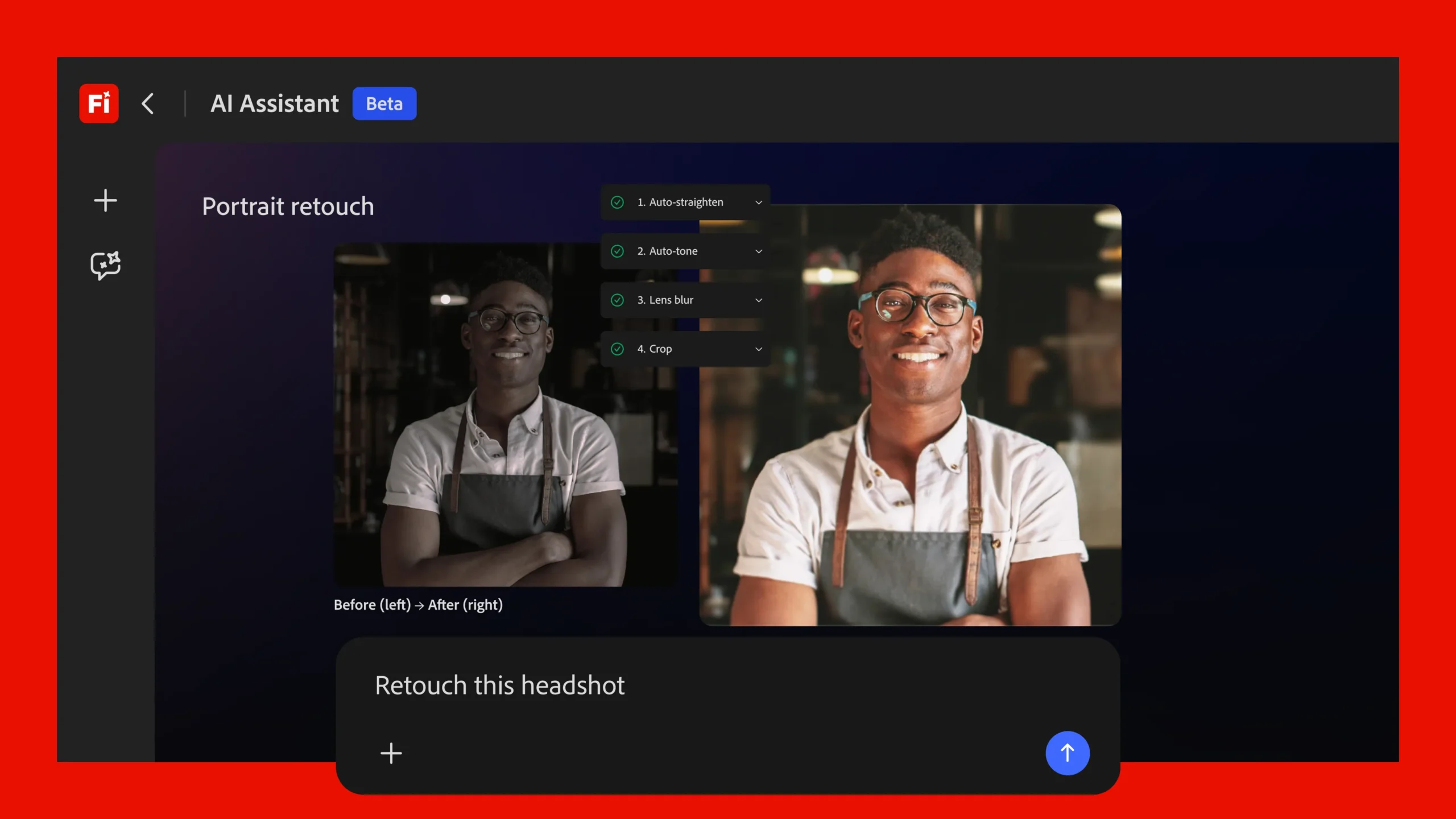
Adobe is preparing to reshape the way photographers, designers, and video editors approach their projects by introducing Firefly AI Assistant, a conversational agent capable of carrying out complex, multi-step edits across the entire Creative Cloud family. Rather than selecting tools, scrubbing through menus, or memorizing keyboard shortcuts, users will soon be able to type or speak natural-language instructions such as “retouch this portrait and crop it for Instagram” or “brighten the background and reduce wind noise.” Firefly AI Assistant interprets the request, selects the appropriate apps—Photoshop, Lightroom, Premiere Pro, Illustrator, Express, or others—performs the edits, and returns several versions for the creator to review.
A single interface for the whole toolbox
The concept builds on last year’s Project Moonlight prototype, but it is now positioned as a unified gateway to Adobe’s ecosystem. By collapsing every specialist feature into one chat window, Firefly AI Assistant aims to remove a long-standing skills barrier that separates occasional users from seasoned professionals. A filmmaker can request color grading and audio cleanup in the same breath; a marketing designer can ask for multiple social-media sizes without opening separate documents; and a hobbyist can experiment with advanced retouching workflows without first learning layers, masks, or adjustment curves.
- Natural-language prompts drive edits across multiple applications.
- Suggested variations accompany every change, allowing side-by-side comparison.
- Sliders and tooltips surface automatically for deeper manual fine-tuning.
- Results can be opened in any Creative Cloud app for additional control.
Adobe says the assistant orchestrates “complex, multi-step workflows” behind the scenes. For example, a single directive to “polish this talking-head video” could trigger background noise reduction in Premiere, color balance in Lightroom’s video module, and image stabilization in After Effects. The user sees only the final options and the ability to tweak them. This orchestration is designed to preserve the creator’s agency; nothing is forced, and every AI-produced result remains editable with traditional tools.
Learning personal tastes—with permission
Personalization is a cornerstone of the new agent. Over time, Firefly AI Assistant can learn preferred color palettes, typography choices, output formats, and even the order of operations a particular creator likes to follow. According to Adobe’s AI leadership, these preferences are opt-in and project-specific. Creators decide whether the assistant may analyze a document’s layers, metadata, or adjustment history. If enabled, the system will gradually offer suggestions that feel bespoke rather than generic, promising a more consistent creative voice across campaigns or portfolios.
For agencies and teams, Firefly introduces “Creative Skills,” effectively reusable macros that encapsulate an entire style guide or workflow. A brand might define a skill that applies corporate colors, approved logos, and specific export settings. Team members can share these skills, ensuring every piece of collateral meets brand standards—even if the person executing the task is new to the company or unfamiliar with the software.
Reaching beyond Adobe’s walls
In a notable shift, Adobe plans to open these agentic capabilities to third-party AI platforms. The company confirmed that popular models such as Claude will be able to call Firefly functions from outside the Creative Cloud environment. In practical terms, a writer drafting copy in a non-Adobe chatbot could ask, “Generate a matching banner image,” and have the external tool route that request to Firefly, which would then return creative assets without the user ever opening Photoshop. This cross-platform move underscores Adobe’s intent to position Firefly as a service layer rather than a feature locked inside specific desktop apps.
Fresh features for images, video, and audio
The announcement coincides with a broader update to the Firefly platform itself:
- Firefly Video Editor now integrates Adobe Stock footage for instant access to B-roll and background clips.
- New color-adjustment controls and speech-clarity enhancements debut for video projects.
- Precision Flow arrives in image generation, letting users create and compare a wider range of variations without rewriting prompts.
- AI Markup introduces brush and rectangle tools—or reference images—to specify where changes should occur, offering more localized control than all-over generative edits.
Each addition aims to strike a balance between automation and artistic intent. While the assistant can handle rote work—batch resizing, denoising, dialogue leveling—the user can still step in with surgical accuracy when required.
Why conversational editing matters
For decades, creative software proficiency has been both a badge of honor and a barrier to entry. Graphic design courses, certification programs, and online tutorials revolve around mastering technical minutiae. By contrast, conversational editing lowers the on-ramp. A photographer who understands light and composition, but not frequency-separation retouching, can still achieve pro-level skin smoothing simply by asking for it. An entrepreneur launching a product can whip up marketing imagery without hiring a retoucher for every tweak.
That democratization carries economic implications. Freelancers and agencies may complete volume tasks faster, reallocating time to conceptual thinking. In-house marketing teams can respond to trends in real time, iterating on assets without waiting in the queue of a busy design department. Educational institutions might teach storytelling and aesthetics first, leaving tool mastery as an advanced elective rather than a prerequisite.
Guardrails and transparency
Adobe emphasizes that every AI-assisted edit is non-destructive and traceable. The assistant surfaces a history panel that lists the sequence of actions it performed, enabling users to undo steps or examine how a result was achieved. Projects that rely on learn-from-project preferences are tagged, making it clear when the system is personalizing outcomes based on prior work. These design choices aim to maintain professional confidence at a time when AI “black boxes” often raise concerns about lost control or hidden biases.
Imagem: Adobe
Licensing and content ownership remain governed by the same terms that apply to existing Firefly features. Because Firefly is trained on Adobe Stock and public-domain materials, the company argues that generated outputs avoid the copyright pitfalls that have dogged some rival platforms. Nevertheless, creators will be watching closely to see how the assistant handles style replication and derivative works—areas where legal standards continue to evolve.
What’s next?
Adobe has not yet provided an exact launch date. The assistant will first appear inside the browser-based Firefly studio, with phased rollouts to desktop and mobile Creative Cloud applications to follow. Early access programs are expected, giving the company time to refine the natural-language model, expand language support, and tune responsiveness for large projects.
Industry watchers anticipate that the assistant will eventually tackle project management chores—file organization, version naming, collaborative review links—in addition to pixel-level edits. If that happens, Adobe’s chat window could become not just an editing aide but a hub for the entire creative workflow.
For now, the promise is simple: anyone who can describe an idea should be able to turn it into a polished asset, even if they have never opened the Layers panel.
Key takeaways
- Firefly AI Assistant converts everyday language into sophisticated edits across Photoshop, Premiere, Illustrator, and more.
- Personalization is opt-in; the assistant can learn tools, styles, and workflows to deliver consistent results.
- AI-driven Skills package brand guidelines or team workflows for one-click execution.
- Third-party AI models will gain access, extending Firefly’s reach beyond Adobe’s own apps.
- New video, image, and audio features accompany the launch, focusing on speed and precision.
FAQ
How does Firefly AI Assistant differ from Adobe’s existing generative features?
Earlier tools such as Generative Fill focus on single tasks within one application. Firefly AI Assistant acts as a multi-app orchestrator, handling entire workflows through conversation.
Will I lose control of my project if I let the assistant take over?
No. Every AI action is listed in a history panel, and you can undo, modify, or manually adjust any step. The assistant’s suggestions are optional.
Can I stop the assistant from learning my style?
Yes. Preference learning is disabled by default. You must opt in and can restrict it to specific documents or turn it off at any time.
Is the assistant available in all languages?
Initial releases will prioritize English, with additional languages planned during the phased rollout. Adobe has not published a final list yet.
When can I try it?
Adobe has not announced a public release date but says Firefly AI Assistant will debut in the Firefly web studio first, followed by integration into desktop and mobile Creative Cloud apps.