A new bridge emerges for friction-free file transfers between Android phones and computers
Moving photographs, documents, and snippets of text from an Android handset to a Mac has long required a patchwork of cables, cloud drives, and patience. A freshly launched tool called Warp aims to replace that juggling act with a workflow that feels closer to Apple’s own AirDrop—yet remains platform-agnostic enough to serve Windows and Linux users as well.
How Warp works
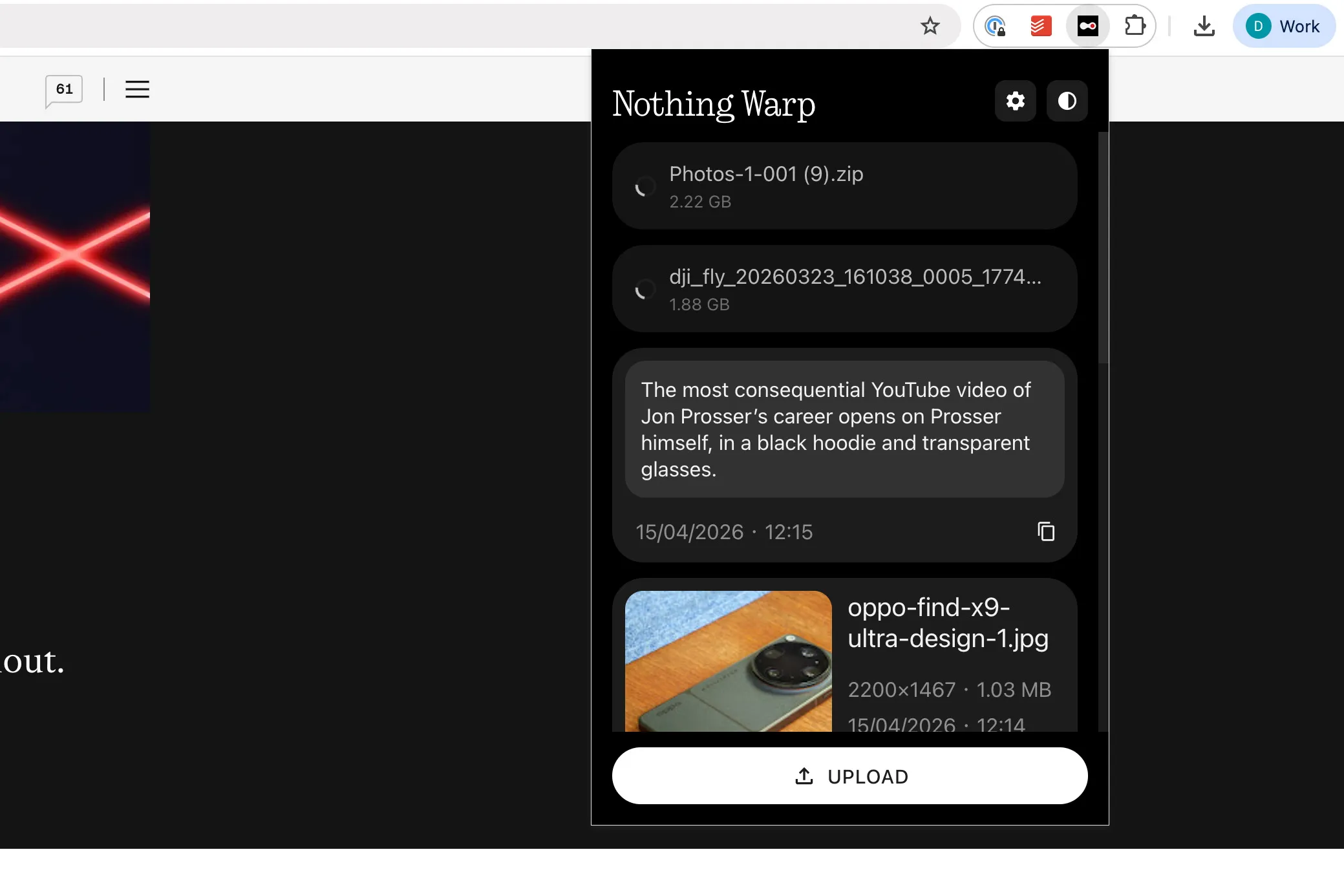
Warp is delivered in two pieces: an Android application and a companion browser extension that functions in any Chromium-based browser. Once both components are installed and linked to the same Google account, the software presents itself as another option inside Android’s native “Share” sheet. On the desktop, Warp lives in the right-click menu, offering to push local files, highlighted text, or web images directly to the mobile clipboard or storage.
The process feels instant for small payloads. Tap “Share,” choose Warp, and within seconds a notification appears on the computer instructing you to download or copy the item. The reverse is equally simple: right-click a file in the browser, hit “Send with Warp,” and a notification surfaces on the phone. Under the hood, though, Warp is not shuttling data peer-to-peer. Instead it uploads everything to a temporary folder on Google Drive, then provides the receiving device with a link to fetch it.
Multiple devices, single account
Unlike many closed ecosystems, Warp does not restrict transfers to a one-to-one relationship. A single Google account can authorize several phones, laptops, or desktops, and any one of them can fire a file into the queue at any time. If a recipient device is switched off or disconnected, the item simply waits in the cloud. The next time that machine connects, Warp’s extension checks the queue and delivers a prompt to download.
This architecture delivers two notable benefits:
- You can kick off a transfer without confirming that the other device is awake or nearby.
- The approach guarantees continuity across operating systems—macOS, Windows, and Linux all play by the same rules because the transport layer is the browser, not a proprietary protocol.
Speed versus convenience
Warp’s reliance on cloud storage is a double-edged sword. For snippets of text, bookmarks, or a handful of JPEGs, performance feels indistinguishable from local Wi-Fi transfers. The moment a multi-gigabyte video enters the picture, the service reveals its ceiling. A two-gigabyte 4K clip can take ten minutes or more to reach the cloud, after which the same data set must still be pulled back down to the other machine. On a sluggish connection that round-trip delay becomes a deterrent.
Conventional device-to-device protocols—AirDrop, Nearby Share on Android, or proprietary PC suites from phone makers—tend to fare better with larger files because they maintain a direct link on the local network. Warp trades that raw speed for universality and ease of use. Whether that bargain is worthwhile depends on the type of material you shuttle every day.
Security and privacy posture
Because the service piggybacks on Google Drive, Warp’s creators never store the data themselves. The files occupy a hidden section of the user’s Drive allocation and are automatically pruned. Only the ten most recent uploads persist; older entries are deleted as new arrivals bump them off the list. So long as you have free space in Drive, there is effectively no fixed size limit beyond Google’s own caps.
End-to-end encryption is not explicitly advertised, but the transfer inherits Google’s standard authentication checks, including optional two-factor verification. For most users the bigger question may be metadata: Warp does see filenames and sizes, even if it never hosts the binary data. Individuals whose work requires stringent confidentiality might still prefer a direct local transfer or an encrypted zip file.
Comparisons with existing solutions
Apple’s AirDrop remains the gold standard for speed and seamlessness inside its own hardware lineup. Google has begun rolling out an AirDrop-style bridge to select Android phones and recent Mac models, but the feature is currently confined to specific Pixel and Samsung devices. Several Chinese manufacturers—Oppo, Honor, and others—ship utilities that claim Android-to-Mac support, yet those tools generally require the company’s own handset and a dedicated desktop client.
Warp sidesteps that fragmentation by leaning on the browser, a piece of software every modern computer already has. In practice, that means the setup time is measured in minutes, with no driver installs or account migrations. The cost is paid in cloud round-trips for heavy media.
First-day impressions from the field
Reporters who juggle test phones, review units, and an employer-issued MacBook have quickly adopted Warp. The little utility excels at what journalists and marketers do fifty times a day: paste a screenshot, copy a quote, share a link. Its shortcomings appear only when raw footage or large slide decks enter the ring. Early adopters say they intend to keep the tool in their arsenals while waiting for a direct LAN option that could turn it into a true AirDrop competitor.
Imagem: Dominic PrestCloseDominic PrestNews
Where Warp fits in a broader workflow
For many users, Warp will not replace traditional cloud drives, USB cables, or network shares. Instead, it occupies a middle ground between ephemera and archival storage:
- Ephemera: fleeting text clips, social media images, QR codes, tiny PDFs that need to move instantly.
- Middle tier: photo albums or short videos that are too big for email but small enough that a few minutes of cloud upload is tolerable.
- Archival: multi-gigabyte movie files or system backups—still better served by an external SSD or a specialized sync service.
In the middle tier, Warp’s perishability can be an asset. Because items self-delete after ten uploads, users need not remember to clear clutter. That design minimizes the risk of leaking sensitive material from an unattended workstation, provided the Google account itself is secured.
Beta label and future possibilities
The current build is officially labeled beta. That status signals two things: first, occasional bugs may surface; second, the feature set is not locked. Enthusiasts have already requested enhancements such as selective expiration windows, direct peer-to-peer transfer when both devices share a Wi-Fi network, and optional end-to-end encryption keys independent of Google. If the developers can layer those upgrades without compromising the drop-dead simplicity that defines Warp today, the tool could evolve into the default choice for cross-platform sharing.
Key takeaways
- Warp pairs an Android app with a browser extension, enabling file, text, and image transfers to macOS, Windows, or Linux.
- Transfers route through Google Drive, making them platform-agnostic but slower for large data sets.
- The service is free during its beta period and automatically limits stored items to the ten most recent.
- Security relies on Google’s existing infrastructure; Warp itself does not host the data.
- Ideal for lightweight, frequent exchanges—less so for multi-gigabyte projects.
Frequently Asked Questions
Is Warp completely free?
Yes, the current beta version is available at no cost. The developer has not announced future pricing or subscription plans.
Do I need a Nothing phone to use Warp?
No. Warp runs on any Android device running a recent version of the operating system and a Chrome-compatible browser on the computer side.
Can I use Warp without linking a Google account?
Not at the moment. The service relies on Google Drive as its transport layer, so account linkage is mandatory.
Are there size limits on the files I can send?
The only cap is the free space in your Google Drive. However, transfers above a few gigabytes will be slow because they must upload and then download again.
How long do shared items remain available?
Warp retains the ten most recent uploads. When an eleventh file is added, the oldest entry is automatically deleted from the queue and from Google Drive.
Does Warp work with iPhones or iPads?
Currently, no iOS client exists. The developers have not indicated when or if an Apple mobile version will arrive.